
Home / Security
Compliance & security
See every security finding across your AWS accounts, and track each one to a fix
Acuity checks each connected account, scores the failures by severity and tracks every finding through remediation. When someone asks what is being done about the critical findings, the answer is in the platform.
Why it matters
One current list of findings for all your accounts
Acuity pulls findings from every account into one list and keeps the status of each one up to date. You can show an auditor how the numbers have moved over time. Without it, each AWS account reports findings in its own console and keeps no record of what you decided about them.
Compliance posture
All your compliance findings in one place
Acuity checks every connected account against AWS Well-Architected, AWS Foundational Security Best Practices and AWS Control Tower guardrails on a continuous basis. Failures are grouped by severity, account, service and framework.
Each finding has a status, which you can set on a check or on a single resource. A check takes the status of its least advanced resource, and a resolved issue that comes back in a later scan reopens with its history.
Auditors often ask for the number of critical findings across all accounts. Acuity shows that number and keeps it current. The AWS console has no single view for it.
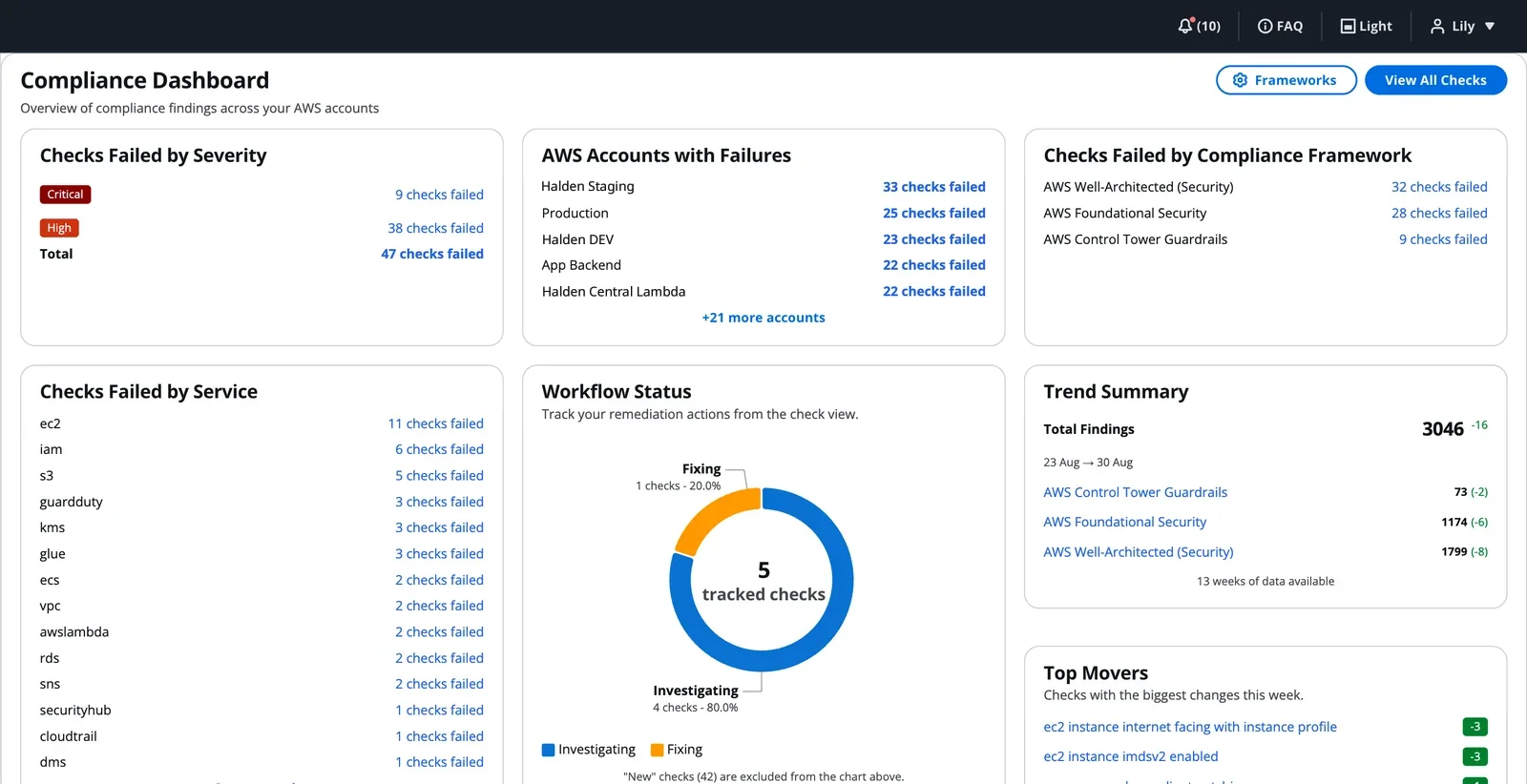
Compliance dashboard. Failures by severity, account, service and framework, next to this week’s changes.
Trend and evidence
Show auditors how your findings change over time
Acuity tracks findings per framework week by week and lists the checks behind each change. You can see whether the backlog is going down.
3,046 findings, down 16 on the week tells an auditor the backlog is being worked.
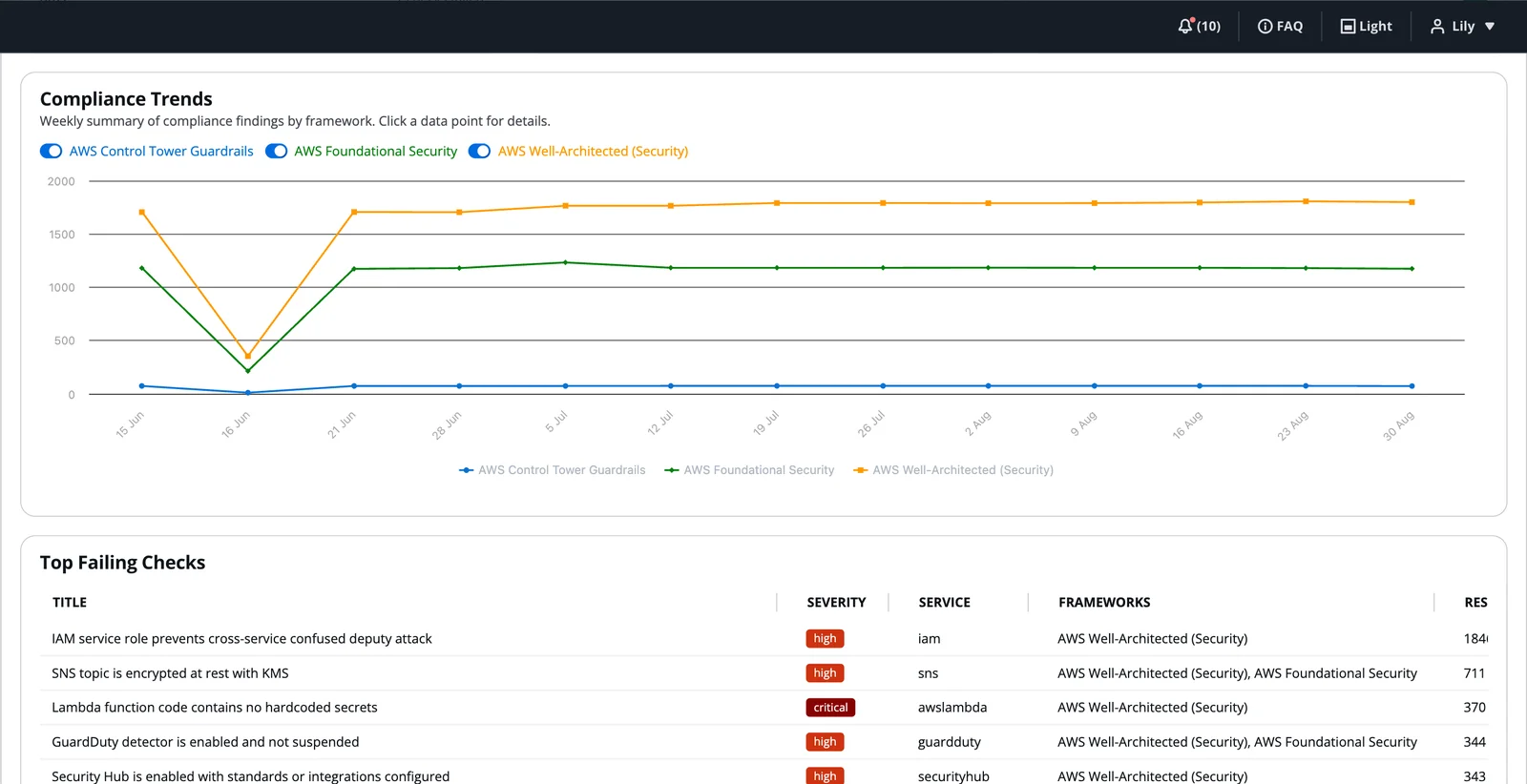
Compliance trends. Findings per framework week by week, with the checks behind the number listed underneath.
Vulnerability findings
Amazon Inspector findings from every account in one list
Acuity brings together Amazon Inspector findings from every account and region. A CVE that affects instances in four accounts shows as one finding with four resources.
Amazon Inspector reports per account. With twelve accounts you would check twelve consoles and see the same CVE twelve times.
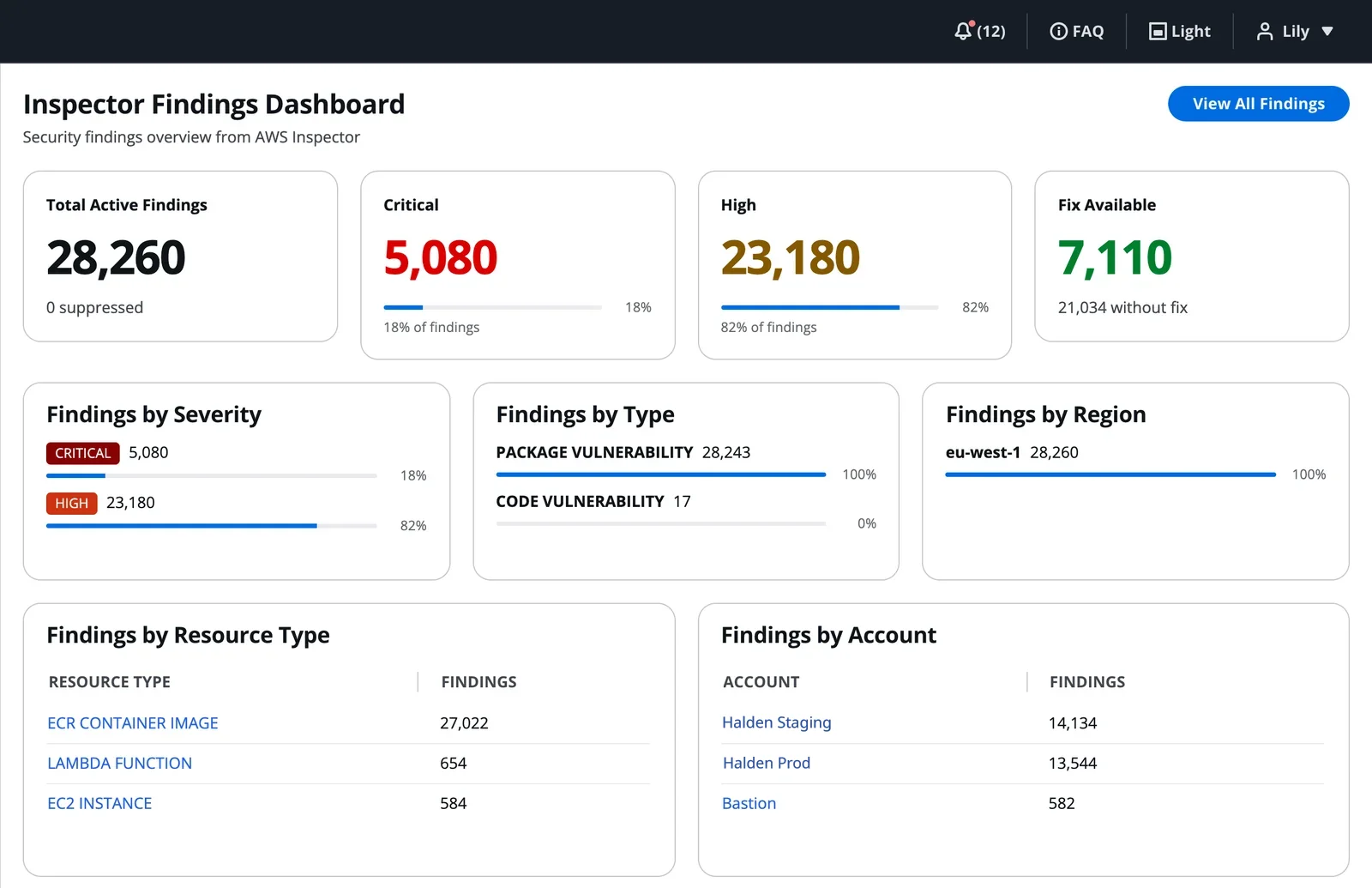
Inspector findings. Every account in one dashboard, with the 7,110 findings that have a fix available shown separately.
Identity
Common IAM risks, counted across every account
Acuity counts users without MFA, access keys that have not been rotated, permissive policies and policies attached directly to users. The counts cover every connected account.
Old access keys and users without MFA are counted in every account, so you can see where to start.
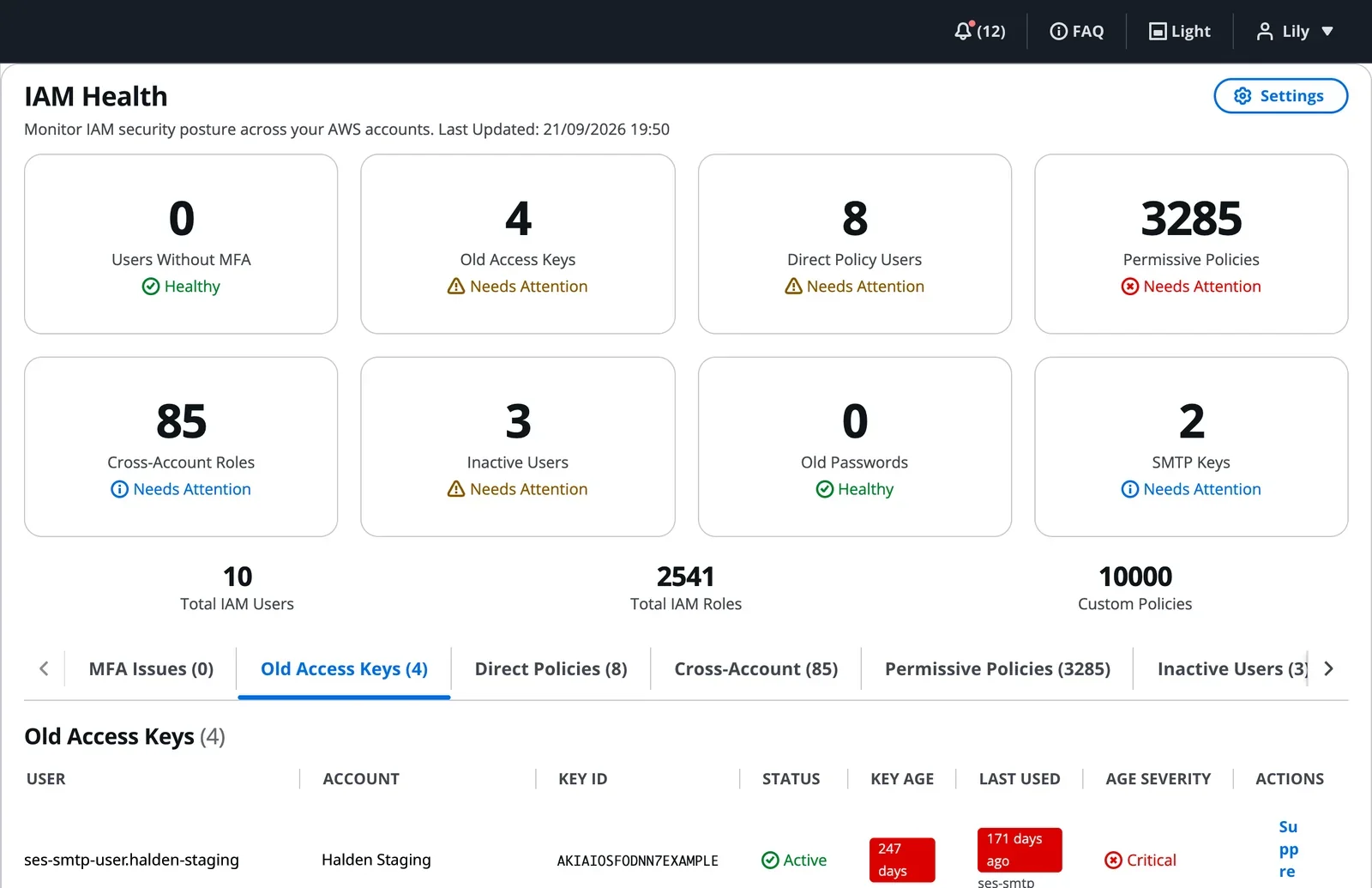
IAM health. Counts for every account, with the keys, roles and users behind each count listed.
Access failures
Spot misconfigured roles and expired credentials from access denials
Acuity tracks AWS CloudTrail access errors and console sign-ins across all your accounts. A rise in denials is often the first sign of a misconfigured role, an expired credential or someone probing.
Acuity shows the pattern behind the errors. You can see which principal and account they come from, how often they happen and whether they are new.
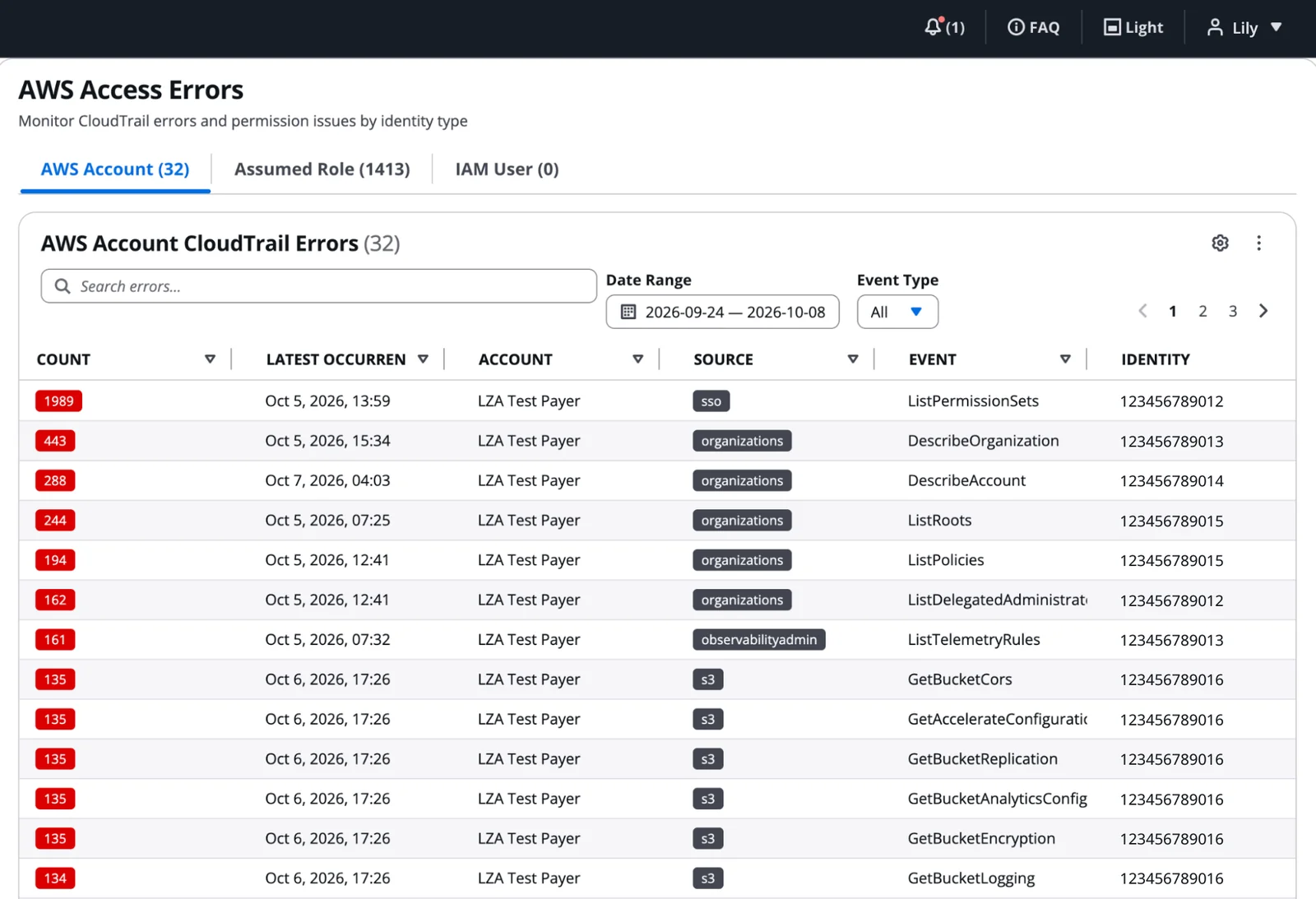
AWS access errors. AWS CloudTrail errors grouped by identity type, with the most frequent first.
What you get
Security capabilities in full
Automated compliance checks
Checks run continuously across every connected account, and each failure gets a severity score. Your posture is up to date whenever an audit comes round.
Resource-level suppression
Accept a risk with a reason, and Acuity keeps a full audit trail. Suppressed items stay visible so you can review them later.
Amazon Inspector integration
Vulnerability findings from Amazon Inspector appear in the same list, with the same severity scale and remediation workflow.
IAM health monitoring
Find inactive users, overly permissive policies and cross-account roles in every account as your estate grows.
AWS CloudTrail error tracking
Track access-denied patterns and API errors across all accounts. These are often the first sign of a misconfiguration or someone probing.
Console sign-in audit
See who signed in to which account, from where, and whether they used MFA, for all your accounts in one view.
Access model
What Acuity can and cannot see
Read-only, least privilege
Acuity connects through read-only IAM roles created by the onboarding AWS CloudFormation template. Explicit denies block access to your data and credentials, even where another policy would allow it.
What the template creates
The IAM roles, an S3 bucket for your Cost and Usage Report and EventBridge rules that forward sign-in and access error events. These are the only things Acuity can change in your account.
Metadata only
Acuity stores the metadata it needs for reporting. It never reads or stores your workload data, such as the contents of your buckets, databases and instances.
Reviewed by AWS
Acuity has passed the AWS Foundational Technical Review, which checks a partner product against AWS security and reliability practices. It is built and run by CirrusHQ, an AWS Premier Tier Partner.
Hosted in AWS Ireland
Acuity stores its data in eu-west-1, encrypted in transit with TLS 1.3 and at rest with AES-256. Each customer's data is kept separate, and it is deleted when your organisation is offboarded from Acuity.
MFA on by default
Multi-factor authentication is on by default for every Acuity user in your organisation.
Related
Cost
Cost analytics
Anomaly detection, attribution by service and tag, and commitment tracking.
Operations
Infrastructure & operations
Stack drift, patch compliance, lifecycle dates and estate-wide health events.
Commercial
Pricing
Compliance checks and security monitoring start at the Standard tier, $2 per account per day.
Run the checks against one account.
Connect your first account on the Free tier. Compliance checks and security monitoring start on Standard at $2 per account per day.