
Home / Operations
Infrastructure & operations
Know where your AWS infrastructure has changed since you deployed it
Acuity shows which CloudFormation stacks have drifted and which software is near end of support, across every connected account. Nobody has to log in to each account to check.
Why it matters
Spot the issues that never trigger an alarm
Acuity keeps count of the slow changes that monitoring misses. Stacks drift from their templates. Runtimes reach end of support while they keep running. Instances stop reporting and drop out of the reports meant to cover them. None of these cause an immediate failure, so they rarely raise an alarm.
Drift detection
See every stack that has drifted from its template
For each CloudFormation stack in every account, Acuity shows how far it has moved from its template. That includes resources the stack created and no longer controls.
Check coverage next to the drift count. In this example 330 stacks have drifted and 653 have never had a drift check. A low drift count only tells you something when most stacks have been checked.
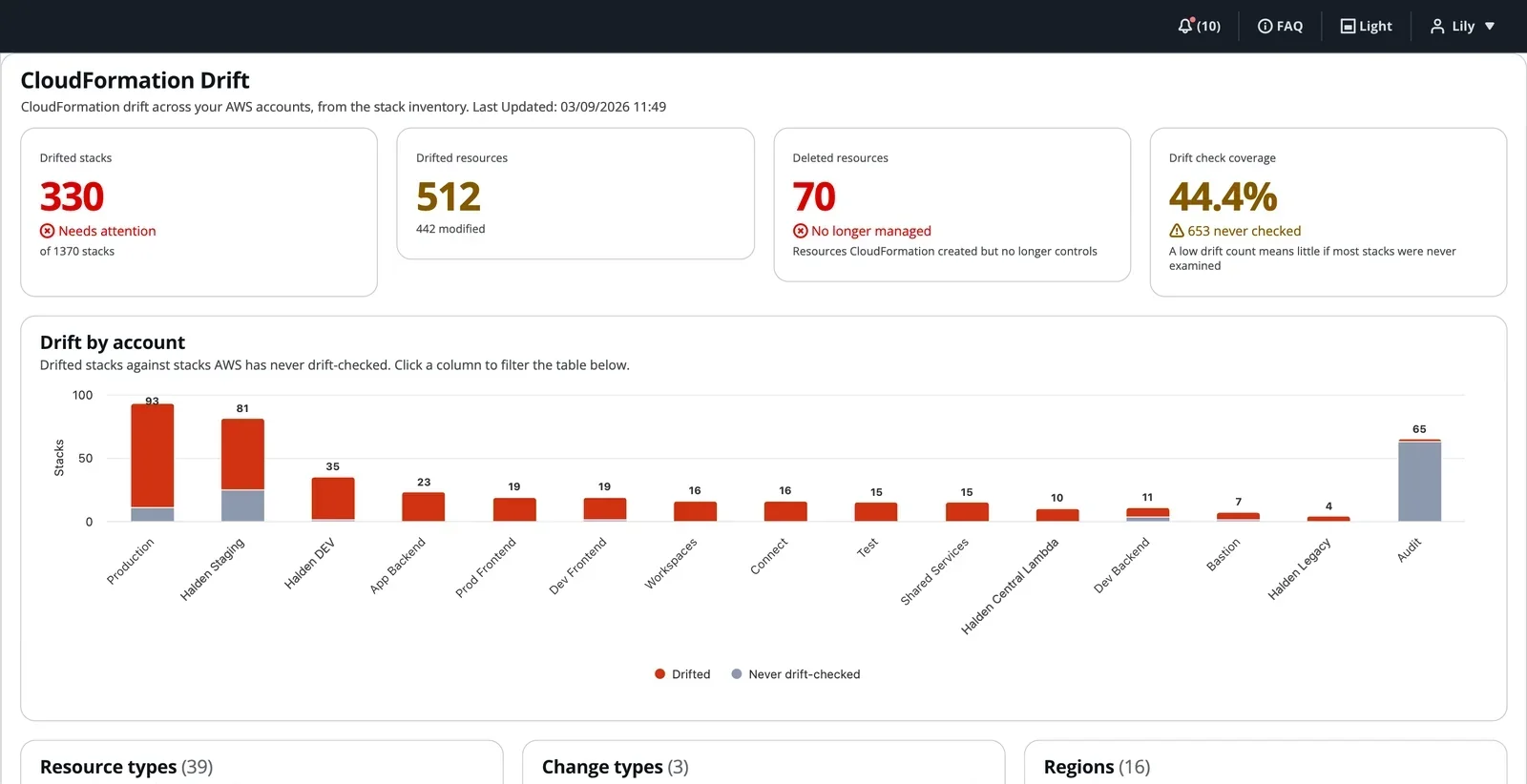
Drift and coverage. Drifted stacks shown next to the stacks AWS has never checked.
Stack detail
Find each drifted stack, its account and its last check date
Search every drifted stack in one table. Charts show which resource types drift most often, the kinds of change and the regions involved.
AWS::IAM::Role is the most common drifted resource here, with 157 occurrences. Seeing the pattern lets you fix the cause once.
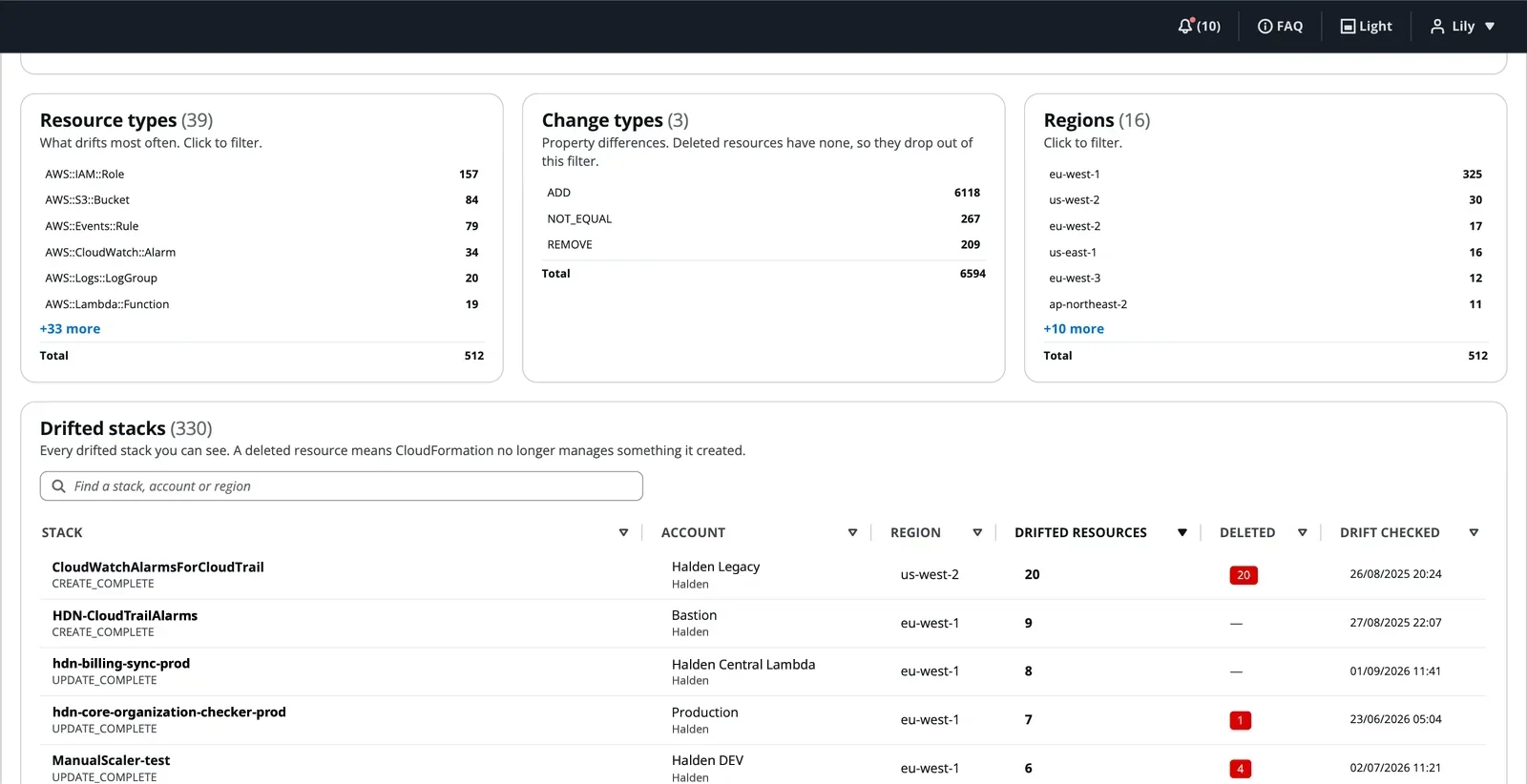
Stack detail. The most common drift, where it happens and when each stack was last checked.
Product lifecycle
See what has reached end of life and what expires next
Acuity lists runtimes, engine versions and operating systems across your accounts. It groups them into end of life, expiring soon and expiring within six months, with the number of resources in each.
Lambda functions on an expired runtime stop getting patches. Later you can no longer deploy updates to them. Acuity lists them so you can upgrade before you need to ship a fix.
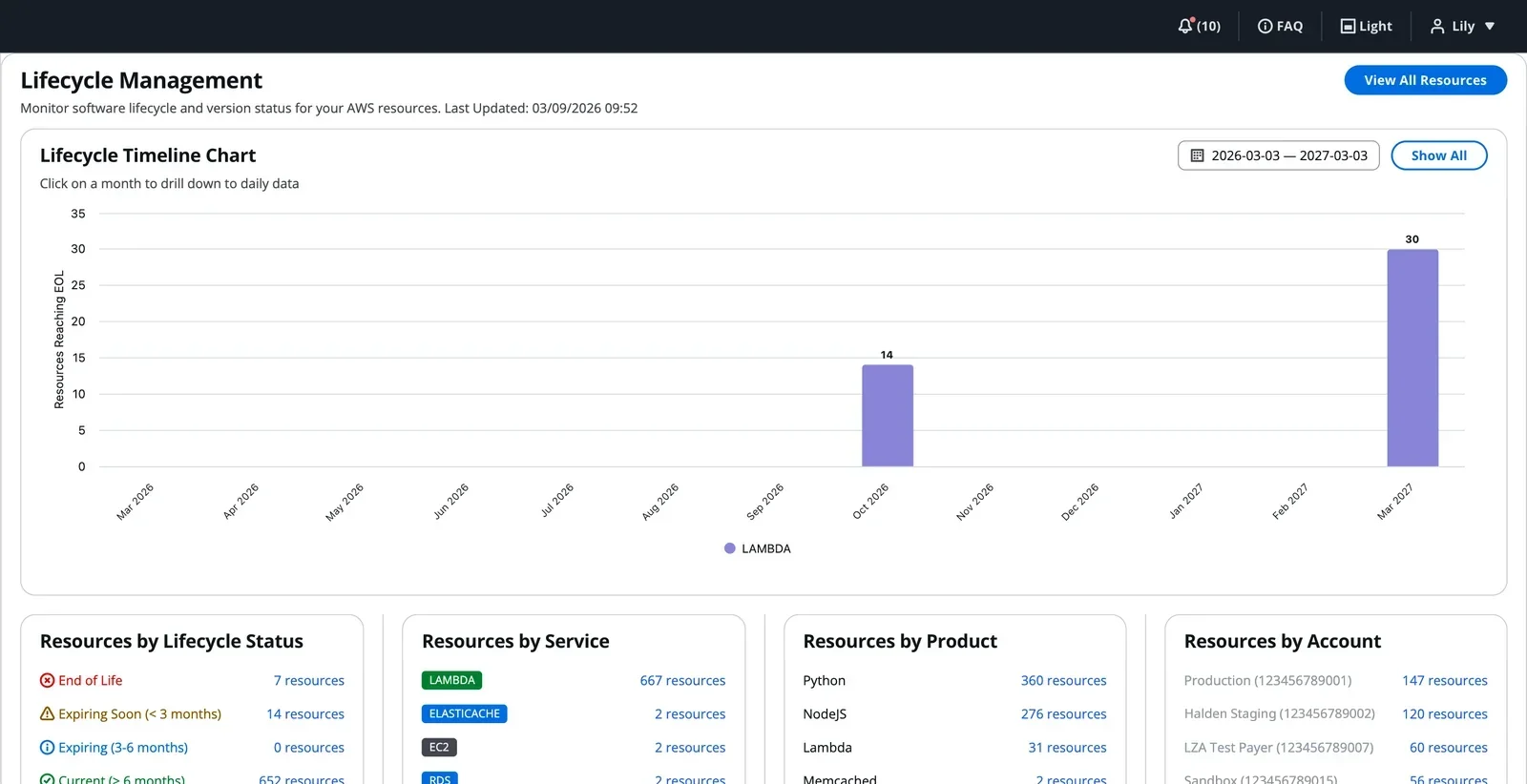
Lifecycle status. Counts of end-of-life, expiring and current resources across your accounts.
Support dates
Every version, with the date its support ends
The timeline lists each product and version with its service, end-of-life date, status and resource count. You can suppress versions you have chosen to accept.
Memcached 1.5.16 reached end of life in March 2020. It kept running without errors, so nothing alerted anyone. It has had no fixes since.
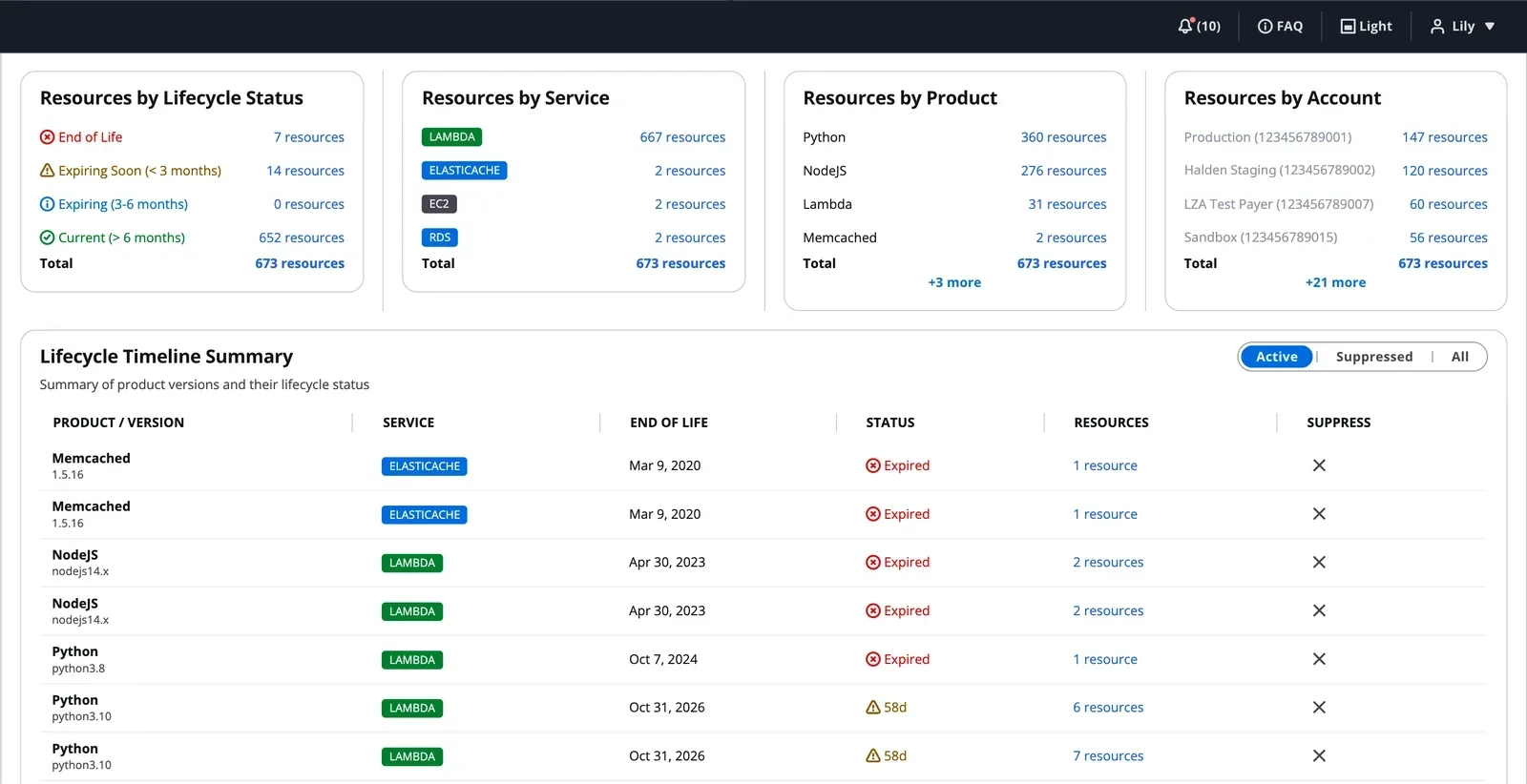
Versions and dates. Each version with its end-of-life date and the number of resources affected.
Software inventory
See the software installed on each instance
Acuity collects packages and versions from AWS Systems Manager on your managed instances. It shows vulnerability findings for each platform and which platforms have been scanned.
Scan coverage is shown next to the findings. A platform with no findings may be clean or may never have been scanned. The coverage table tells you which.
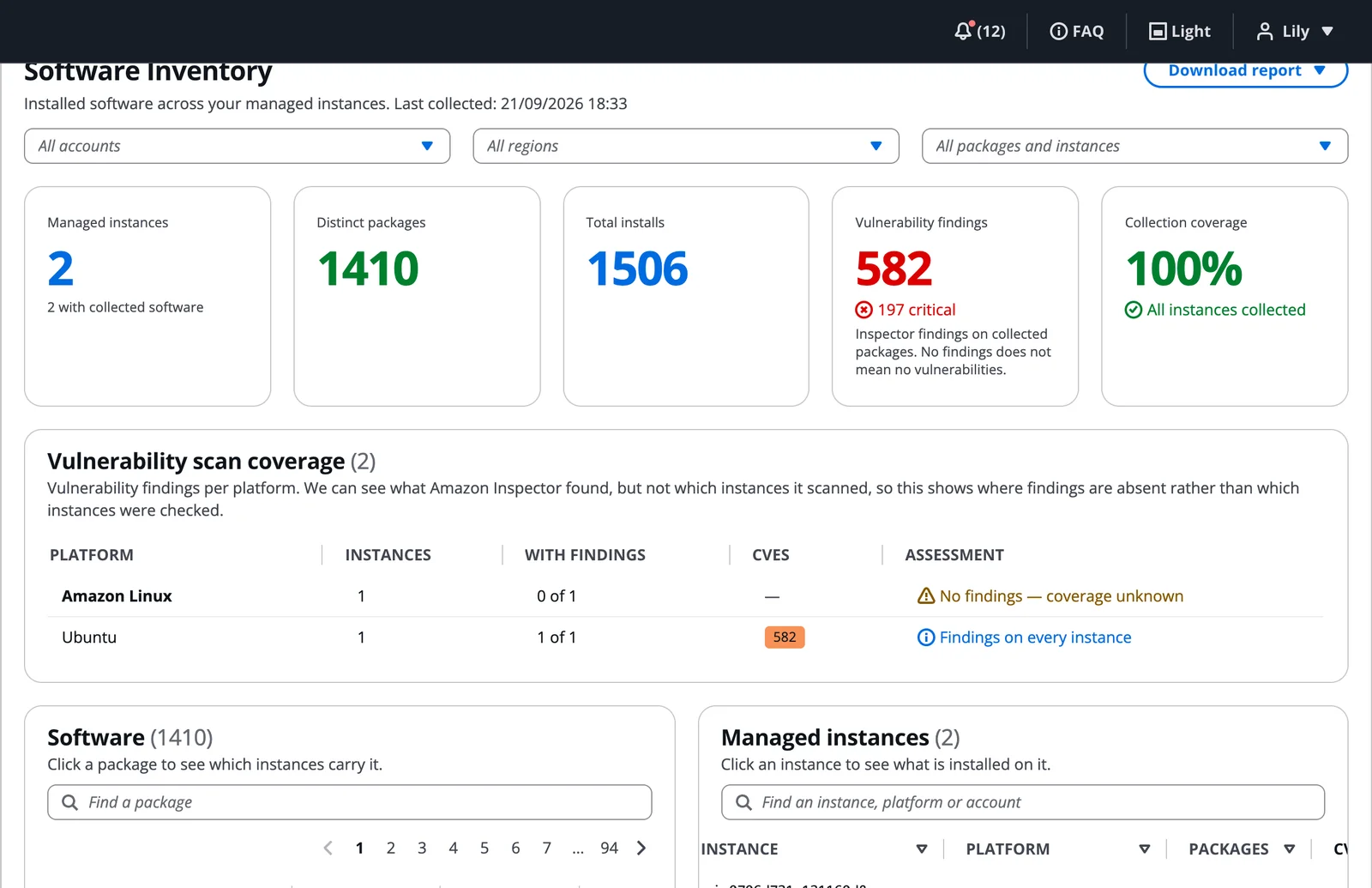
Inventory and scan coverage. Installed software and the platforms Amazon Inspector has scanned.
Package vulnerabilities
See which instances carry each vulnerable package
Each package is listed with the instances and versions that have it and the CVEs against it. A vulnerable library shows up as one row, so you don't have to search every host.
This example has 582 findings across 1,410 packages. The package view shows which instances carry the ones that matter most.
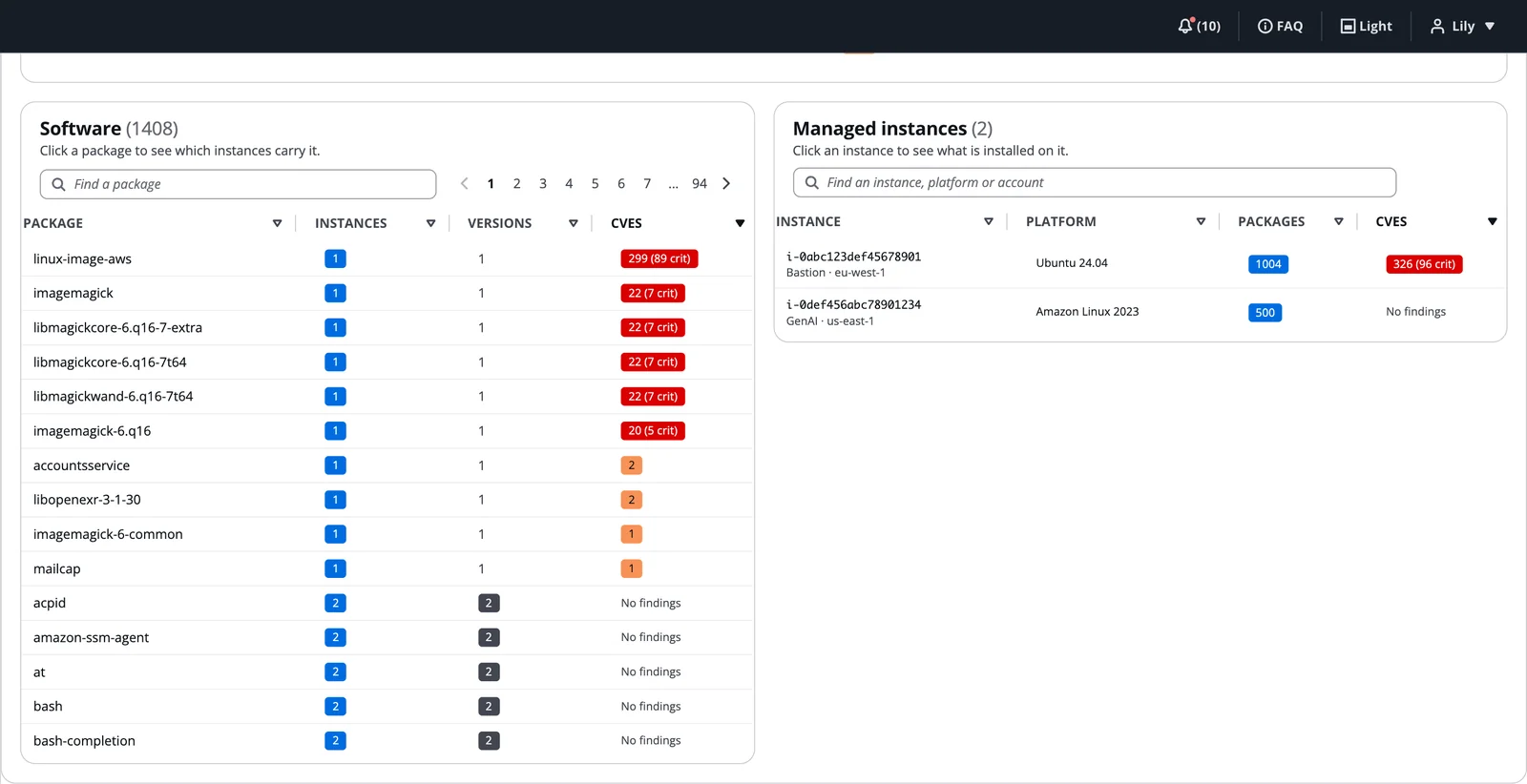
Packages and their CVEs. The instances and versions carrying each package, with its open CVEs.
What you get
All operations features
CloudFormation drift detection
Drift checks for stacks across all your accounts, with the resources that no longer match their template.
Patch compliance tracking
EC2 patch state by account and by patch baseline. Instances that have stopped reporting are listed too.
AWS Trusted Advisor integration
AWS best-practice recommendations for every account, shown alongside the rest of your data in Acuity.
AWS Health Events
Scheduled maintenance, retirements and service issues that affect your resources, collected from every connected account.
Infrastructure changelog
A record of what changed in your accounts and when. Useful when you review an incident.
Notification channels and rules
Send alerts by email or Slack, routed by rules you set. For example, drift alerts can go to the platform team and cost thresholds to finance.
Dashboards
Build a dashboard for each team
Dashboards are built from widgets, so the platform team and finance can each have their own landing page. Build a view, save it and share it.
Widget-based composition
Choose widgets for cost, compliance, drift and health events, and arrange them for the people who will use the dashboard.
Limited to what each person can see
Dashboards follow the same account-level permissions as the rest of Acuity. Sharing a dashboard never gives anyone access to data they couldn't already see.
Related
Cost
Cost analytics
Anomaly detection, cost by service and tag, and commitment tracking.
Security
Compliance & security
Findings scored by severity, a remediation workflow and suppression with an audit trail.
Commercial
Pricing
Priced per AWS account per day and billed on your AWS invoice. Each account can be on a different tier.
See what has drifted since your last deploy.
Connect your first account on the Free tier. Drift detection and lifecycle tracking start on Standard at $2 per account per day.